
A useful ChatGPT response starts with a clear goal, relevant context and an output you can evaluate.
The quality of the result depends on both what you ask and how clearly you define success.
ChatGPT can infer a lot, but it cannot reliably guess your audience, constraints or definition of success. This guide explains how to make those requirements explicit and refine them when the first answer misses the mark.
Understanding prompts
What is a prompt?
A prompt is the input you give ChatGPT: a question, request, instruction or goal. A useful prompt does more than name the topic. It defines the result you need and the information that could change the answer.
ChatGPT may also use Custom Instructions, project context, memory, uploaded files, web search or connected sources. For the current task, it can only work with the context you provide or explicitly make available.
A good prompt gives the model enough direction to produce a useful response without burying the task under irrelevant detail. OpenAI’s current prompting guidance summarizes the useful components as a goal, context, output requirements and boundaries.
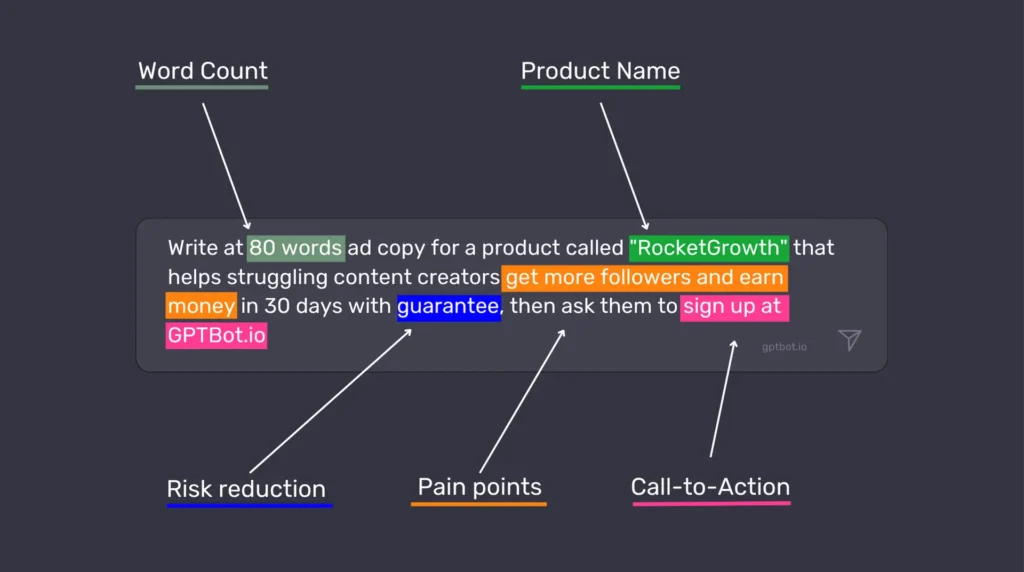
Why are prompts crucial for effective communication with ChatGPT?
The way you phrase a prompt determines what task ChatGPT believes it should complete, which context it should use and what shape the answer should take.
Let me give you a quick example. If you ask, “Tell me about dogs,” you’ll get general information about dogs as a species. But if you ask, “I’m thinking about getting a Border Collie for my small apartment in the city. What should I consider?” you’re going to get a much more specific and useful response tailored to your situation.
Effective prompts matter for several reasons:
- They save time by getting you closer to the answer you need on the first try
- They unlock capabilities that aren’t apparent with basic questions
- They help avoid misunderstandings and irrelevant information
- They allow you to tap into the model’s knowledge in much more specific ways
Prompting is a practical skill that improves through testing. Save the versions that work, note why they work and refine them when the task changes.
Tips for crafting effective prompts
Be specific with your request
Vague prompts lead to vague answers. It’s as simple as that.
Instead of asking “How can I improve my website?” try something like “What are 5 ways to reduce the bounce rate on my e-commerce website that sells handmade jewelry?”
The more specific you are, the more targeted and useful the response will be.
This means including relevant details like:
- Your goal or the problem you’re trying to solve
- Any constraints or requirements
- The format you want the answer in
- The level of detail you’re looking for
For example, compare these two prompts:
Bad prompt: “Write me an email.”
Good prompt: “Write me a friendly email to a client explaining that their project will be delayed by two weeks due to supply chain issues. Keep it under 200 words and include an offer for a 5% discount on their next order.”
The second prompt gives ChatGPT enough guidance to produce a relevant draft without requiring several corrective follow-ups.
Provide context and background information
ChatGPT cannot reliably infer your business, audience or situation unless that information is available in the conversation, project or connected source. Relevant context helps it tailor the response to the actual task.
This might include:
- Who you are and who you’re communicating with
- What you’ve already tried
- Relevant background information
- Industry-specific context
- Your level of expertise in the subject
For instance, if you’re asking for help with a marketing strategy, mentioning that you’re a small business with a limited budget targeting retirees will result in very different advice than if you’re an established brand looking to reach Gen Z.
You are defining the situation that should shape the answer, not merely asking a question.
Use explicit constraints and guidelines
State any constraints or guidelines that materially affect the result.
This might include:
- Word count or length requirements
- Tone and style preferences
- Formatting needs
- Complexity level (technical vs. simplified)
- Specific elements to include or exclude
For example: “Explain quantum computing in simple terms a 10-year-old would understand. Use analogies related to everyday objects, keep each paragraph under 3 sentences, and avoid technical jargon completely.”
These constraints act like guardrails that channel ChatGPT’s responses in the direction you want, making it much more likely you’ll get something usable without extensive editing.
Experiment with various phrasings and approaches
The wording of a request can change the quality of the response. If the first answer misses the mark, identify what was unclear and revise that part of the prompt.
Some variations to try:
- Change your request from a question to a directive: “Tell me about…” vs. “Explain…”
- Ask for the same information but from different perspectives
- Request the information in a different format (bullet points vs. paragraphs)
- Ask for examples or analogies if a concept isn’t clear
Treat prompting as an iterative process. Review the answer, identify the first important miss and adjust the relevant instruction rather than rewriting everything.
Advanced prompting techniques
Set persistent instructions and context
In the ChatGPT app, put preferences that should persist across chats in Custom Instructions or project instructions. Keep task-specific context in the current prompt. API developers can use higher-priority instruction fields and message roles.
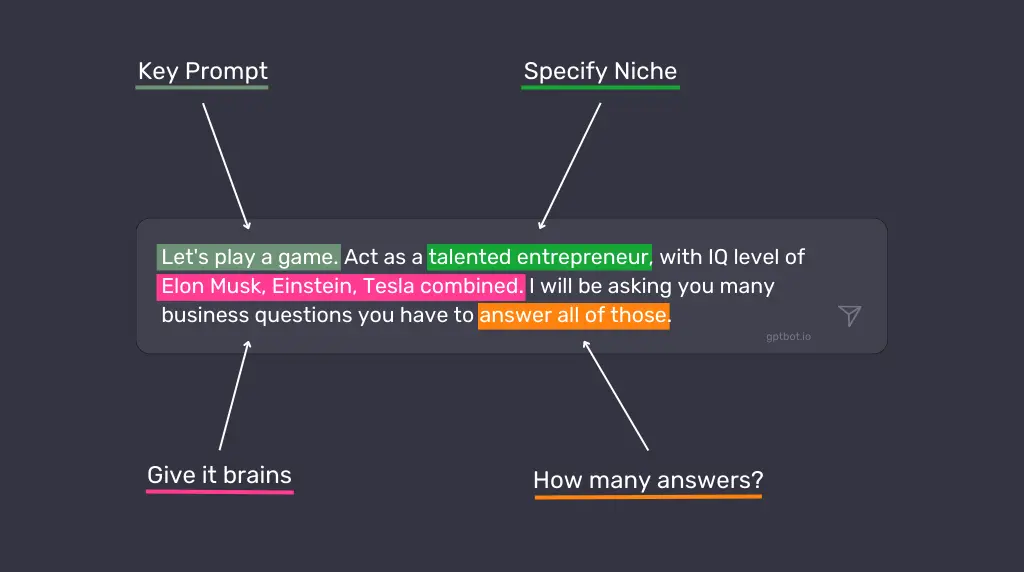
For example, you might use this persistent instruction: “You are an expert copywriter specialized in writing compelling product descriptions for luxury watches. Your tone is sophisticated yet accessible, and you excel at highlighting the craftsmanship and heritage of timepieces.”
Persistent instructions are useful for stable preferences such as tone, formatting and recurring constraints. Review them periodically so outdated guidance does not affect new work.
Persistent instructions work best when they:
- Define the perspective or evaluation criteria ChatGPT should apply
- Establish the tone and style you want
- Provide any ongoing constraints or guidelines
- Set expectations for how detailed responses should be
Step-by-step instructions for complex tasks
For tasks with dependencies, approvals or checkpoints, divide the work into stages. For straightforward tasks, start with the outcome and let ChatGPT choose the process.
For example, instead of “Help me create a business plan,” try:
“I need help creating a business plan for my new dog walking service. Please approach this in the following steps:
- First, outline the key sections a basic business plan should include
- Then, ask me questions about my business idea to gather necessary information
- Based on my answers, help me draft each section
- Finally, suggest ways to make the plan more compelling to potential investors”
This approach:
- Makes the task more manageable for both you and the AI
- Ensures important elements aren’t overlooked
- Creates a more interactive and productive conversation
- Often results in more thoughtful, detailed responses
Role-playing for creative scenarios
A role can focus which questions, tradeoffs or standards ChatGPT should prioritize. It does not give the model expertise it does not already have. Role prompts are most useful for brainstorming, writing and comparing different perspectives.
Some effective role-prompts include:
- “Act as a skeptical venture capitalist reviewing my business idea. What questions or concerns would you have?”
- “Take on the role of a child psychology expert explaining how to discuss divorce with a 6-year-old.”
- “Respond as if you’re a historical figure from the 1800s encountering modern technology for the first time.”
- “Play the role of a UX research director evaluating my app prototype. Based on these user testing results [results], identify the three most critical usability issues, explain how they might impact our core metrics (retention, engagement, conversion), and outline a research plan to validate potential solutions. Your response should balance immediate fixes with longer-term strategic improvements.”
- “Assume you’re a financial advisor who specializes in helping creative professionals plan for irregular income streams. I’m a freelance photographer making between $45,000-70,000 annually, with significant seasonal fluctuations. I have $15,000 in credit card debt, $5,000 in savings, and need to establish both an emergency fund and retirement planning. Create a month-by-month financial roadmap for my next year that accounts for income uncertainty while making meaningful progress toward financial stability.”
Role prompts are most useful when the role changes the evaluation criteria or perspective. The model still draws on patterns in its training data rather than actual professional experience.
The power of iterations and refining responses
Prompting works best as a feedback loop. Start with a basic prompt, evaluate the response and use focused follow-up prompts to correct what is missing or unclear.
For example:
- Initial prompt: “Write a product description for my new organic shampoo.”
- After receiving the response: “This is good, but can you make it more emotional and emphasize the sustainable packaging?”
- Then: “Now add a section about how it’s suitable for all hair types.”
This back-and-forth process:
- Allows you to guide the development of complex content
- Helps you discover what aspects need more attention
- Often results in higher quality final output than trying to get everything perfect in a single prompt
- Mimics the natural collaborative process you might have with a human assistant
Prompt reasoning models directly
Current reasoning models perform best with a direct goal, relevant constraints and a clear definition of success. OpenAI advises against asking reasoning models to reveal chain-of-thought or to think step by step because the model already reasons internally. See OpenAI’s current reasoning guidance.
Instead, ask for the result, assumptions and a concise verification: “Calculate the price of 7 items at $15 each under a buy 2, get 1 free promotion. State the number of paid items and check the final total.”
A concise verification request helps because:
- You can spot potential errors in reasoning
- The answer is checked against explicit criteria
- Assumptions and calculations are easier to verify
- The final answer remains concise and auditable
This technique is particularly valuable for math problems, logical reasoning, coding tasks, and any situation where the process matters as much as the final answer.
The anatomy of an effective prompt
OpenAI co-founder Greg Brockman shared an example often described as an “o1 prompt.” The model name is no longer the important part. The useful idea is the structure.
A practical prompt usually contains 4 key components:
- A clear goal statement
- Specific return format instructions
- Important warnings or constraints
- Relevant context
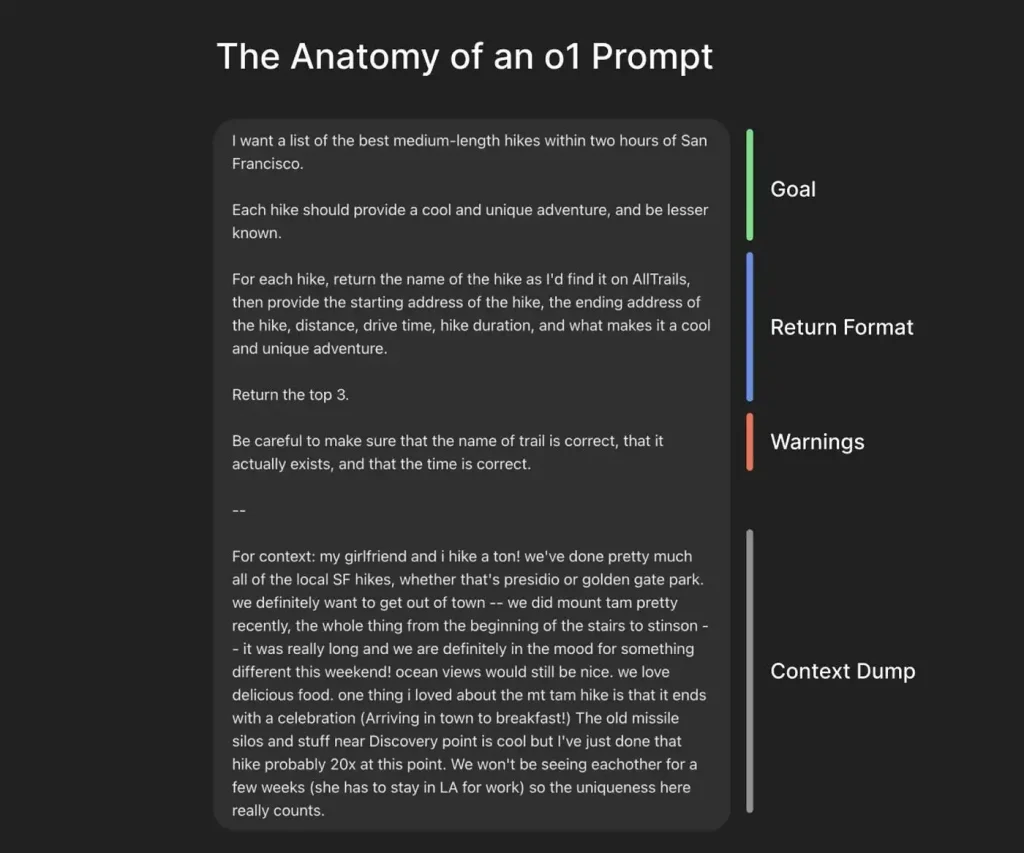
The hiking prompt begins with a precise request, then adds requirements, the desired structure, pitfalls to avoid and personal context that changes the recommendation.
This structure reduces ambiguity without forcing every prompt into a rigid formula.
Common prompting mistakes
Being too vague or open-ended
One of the biggest mistakes is asking a question so broad that ChatGPT has to guess what you want. Questions like “Tell me about marketing” or “How do I get better at my job?” leave the audience, purpose and desired output undefined.
When your prompt is vague:
- The response will likely be generic and surface-level
- You’ll probably need to ask multiple follow-up questions
- You might get information that’s not relevant to your actual needs
Define the specific aspect you need and how you plan to use the answer, then craft the prompt around that result.
Overloading the prompt with information
While context is important, there’s such a thing as too much information. Extremely long prompts with excessive details can confuse the model or cause it to focus on the wrong aspects of your request.
Signs you might be overloading your prompts:
- ChatGPT seems to ignore important parts of your request
- Responses address only the first or last portion of your prompt
- The AI seems confused or asks for clarification
Aim for balance: include relevant details, but remove anything that cannot change the answer. If you have a large amount of information to share, split the task into focused stages rather than one massive prompt.
Misinterpreting output as factual information
ChatGPT can search the web and work with connected sources, but it can still produce plausible errors, misread evidence or cite weak sources. Treat generated output as work to verify rather than a final authority.
When using ChatGPT:
- Be skeptical of specific facts, figures, dates, and quotes
- Verify important information with reliable sources
- Use it to assist research and drafting, then review important conclusions yourself
- Be especially careful with technical, medical, legal, or financial information
Ask ChatGPT to cite sources or quote the supplied material, and verify that each citation supports the claim.
ChatGPT Search can retrieve current web information and provide source links for time-sensitive questions.
Search access improves freshness, but it does not guarantee accuracy. Check important claims against the linked sources, especially for technical, medical, legal or financial decisions.
ChatGPT prompt examples
Browse the ChatGPT prompt library for more ready-to-use examples. For a complete practical workflow, see how the same principles apply when generating and validating business ideas with ChatGPT.
Analyzing successful prompts
Let’s look at some examples of prompts that work particularly well, and understand why.
Example 1: Writing Assistant
Poor prompt: “Help me write better.”
Effective prompt: “I’m writing a cold email to potential clients for my graphic design services. My target audience is small business owners in the food industry. Write an email template that highlights the importance of strong branding, keeps the tone friendly but professional, and includes a clear call to action. The email should be around 200 words.”
Why it works: This prompt provides specific context (cold email, graphic design services), identifies the audience (small business owners in food industry), gives clear parameters (tone, length, elements to include), and has a defined purpose.
Example 2: Research Help
Poor prompt: “Tell me about climate change.”
Effective prompt: “I’m preparing a 10-minute presentation for high school students about climate change. Can you help me create an outline that covers the basic science, three major impacts, and two actionable steps students can take? Please keep the language simple but not condescending, and include one surprising fact or statistic for each section to maintain interest.”
Why it works: This specifies the audience (high school students), format (10-minute presentation), exact structure needed (science, impacts, actions), tone requirements (simple but not condescending), and even includes a specific request for engaging elements (surprising facts).
Lessons learned from ineffective prompts
We can learn just as much from analyzing prompts that didn’t work well:
Example 1: The E-commerce Strategist
Ineffective prompt: “Help me increase my online sales.”
Problem: No information about the business type, current situation, target market, or specific challenges. It’s impossible to provide tailored, actionable advice.
Improved version: “I run a small online boutique selling handmade leather accessories with average monthly sales of $3,000. Our conversion rate has dropped from 3.2% to 1.7% over the last quarter despite steady traffic. Our target audience is professionals aged 30-45 who value quality and craftsmanship. Can you suggest 5 specific strategies to improve our product page conversion rate, focusing on elements we could implement before the holiday shopping season begins?”
Example 2: The Content Creator
Ineffective prompt: “Write me an article about leadership.”
Problem: No indication of length, style, audience, purpose, or specific aspects of leadership to focus on.
Improved version: “Write me a 700-word article about servant leadership for my company blog. The audience is middle managers in the tech industry. Focus on practical ways to implement servant leadership principles in day-to-day team management. Use a conversational tone with 2-3 real-world examples, and include a brief introduction explaining what servant leadership is.”
The key lessons from these examples:
- Include all relevant information in your initial prompt
- Specify format, length, and style requirements
- Identify your audience and purpose
- Break complex requests into clear components
- When appropriate, provide examples of what you’re looking for
Key takeaways
Recap of key points and takeaways
The practical lessons are:
- Prompts are instructions that guide ChatGPT toward the type of response you want
- Specificity reduces guesswork and generic responses
- Relevant context helps ChatGPT tailor the answer to your situation
- Constraints and output requirements shape a usable response
- Persistent instructions, role prompts and staged workflows help when they solve a real task requirement
- Iteration is often the best approach for complex tasks
- Always verify factual information from ChatGPT with reliable sources
Good prompting is less about clever wording than clearly defining the task and how you will judge the answer.
Practice with repeatable tasks
The fastest way to improve is to test prompts on tasks you understand well.
Try a prompt, review the result against clear criteria and adjust the instruction that caused the miss.
Start by taking a prompt you’ve used before and asking yourself:
- How could I make this more specific?
- What context might help ChatGPT better understand what I need?
- Are there constraints or guidelines that would improve the response?
Then experiment with different variations and see what works best. Pay attention to which prompts generate the most useful responses, and look for patterns you can apply to future interactions.
Effective prompting improves more than AI output. It also forces you to define your needs, constraints and standards clearly.
Start with one prompt you use regularly, improve it against real results and save the version that consistently works.